NewsNinja 3.3.1: A new way to watch YouTube
NewsNinja 3.3.1 brings a redesigned YouTube screen with Highlights, tappable chapters, a searchable transcript, Picture in Picture, and landscape full screen, plus Top News in 12 languages and many fixes.

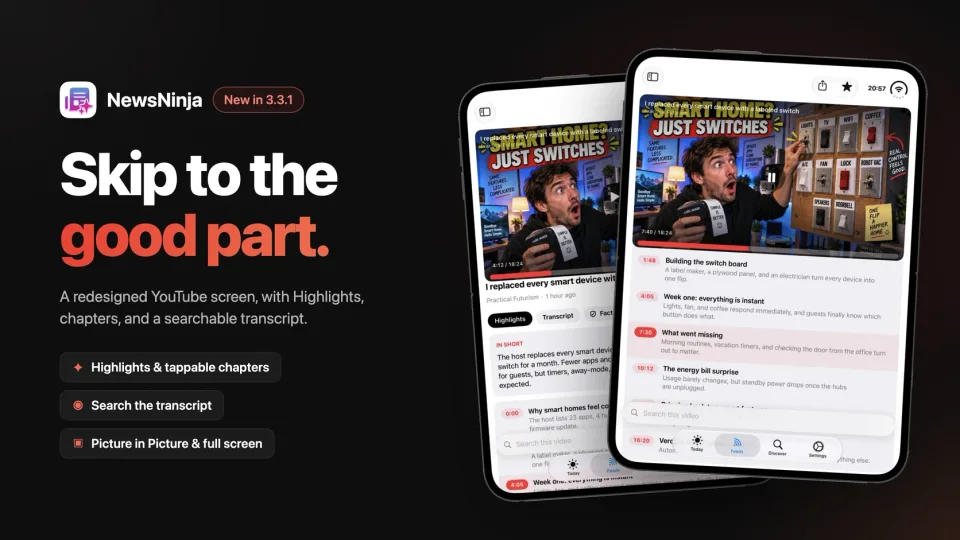
NewsNinja 3.3.1 is mostly a polish release, with a long list of fixes. But it also brings one big improvement: a completely redesigned YouTube screen, built around one idea: getting you to the part of a video you actually care about.
The new YouTube screen
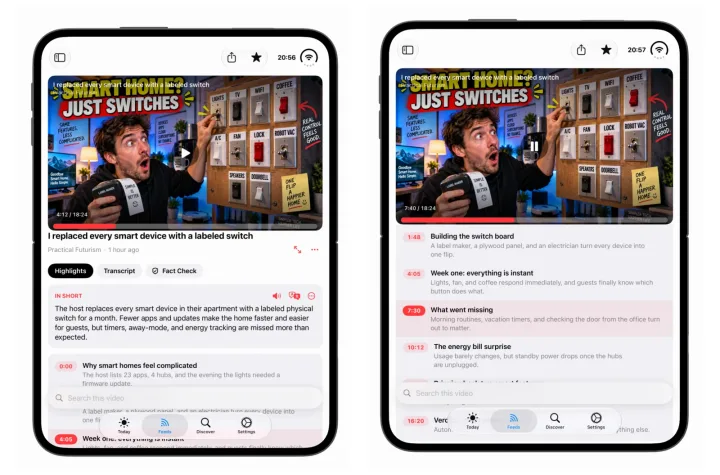
The video now stays pinned at the top while everything else scrolls underneath it, so you can read, search, and jump around without losing the player.
Highlights
Tap Get Highlights and NewsNinja writes two things for the video:
- In short: one or two sentences on what the video is about and its main takeaway.
- Chapters: the video split into sections, each with a timestamp, a title, and a one-line description.
Tap a chapter and the video plays from that point. While the video plays, the current chapter is highlighted, so you always know where you are. Long interviews, talk shows, and keynotes become much easier to navigate: read the chapters, then skip straight to the one you’re interested in.
You can listen to the highlights, translate them into your language, or copy and share them.
Transcript
The Transcript tab shows the full text of the video and follows along as it plays. Tap any line to jump to that moment.
Search this video
The search bar at the bottom searches the highlights and the transcript. Looking for the moment someone mentioned a product, a name, or a number? Search for it, step through the results, and tap to play from there.
Fact Check is one tap away too, if you want to check a claim made in the video.
Picture in Picture and full screen
- Picture in Picture: keep the video playing in a small window while you read your feeds or use other apps.
- Landscape full screen: on iPhone, rotate your phone to watch the video full screen, or tap the Full Screen button.
Highlights, the transcript, and search are part of NewsNinja+. Without a subscription, you can still watch videos and see a preview of each feature.
Top News in 12 languages
Top News is now available in English, Spanish, French, German, Italian, Portuguese, Japanese, Korean, Simplified Chinese, Traditional Chinese, Russian, and Ukrainian. Story titles, overviews, and topics are translated.
To change it, open Customize Today, tap the Top News section, and choose a Language. Automatic follows your device language.
- Conversations. Replies are now grouped into a single row per conversation, like Mail’s Organize by Thread, with the number of messages shown next to the sender. Your inbox is shorter and easier to scan.
- Fixed an issue where translating or summarizing some emails could fail.
Everything else
- Weather units. Choose Celsius or Fahrenheit for weather, or leave it on Automatic to follow your region. Wind and rain switch to metric or imperial to match.
- Compact cards in Feeds take up less space, so more of your articles fit on screen.
- Faster layout changes. Switching card layouts in Feeds is now much quicker.
- Fixed an issue where Today could show articles that didn’t match their section.
- Fixed an issue where Top News sometimes didn’t load, plus some small design tweaks.
Try it
Update to NewsNinja 3.3.1, open a YouTube video from one of your channels, and tap Get Highlights. If you don’t follow any channels yet, search for one in Discover, or see how to summarize a YouTube video.
As always, if something doesn’t work as expected, let me know. Thank you for all the feedback on 3.3.