Introducing NewsNinja 3.3: Stories, Top News, and new themes
NewsNinja 3.3 groups your feeds into Stories, brings the biggest world news to everyone with Top News, and adds new themes for Today.
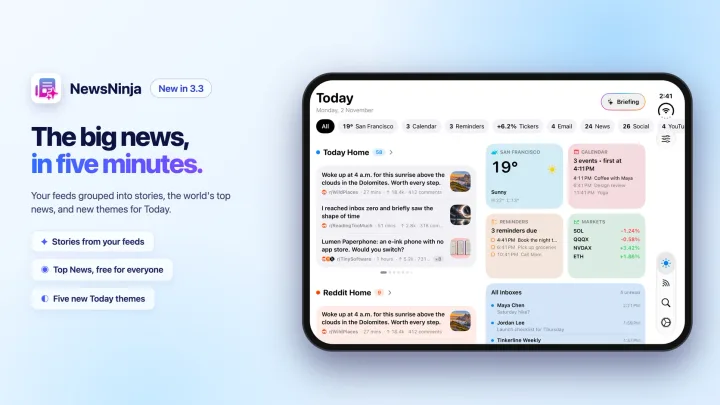
NewsNinja 3.3 is about time. Not everyone has an hour each morning to go through their feeds, and the more sources you follow, the harder it gets to see what really matters.
This release adds two new ways to catch up in a few minutes: Stories, built from your own feeds, and Top News, the biggest news in the world, picked from outlets selected by NewsNinja.
It also brings new themes for Today, so your dashboard can look exactly the way you like.
And as always, no NewsNinja account is required.
Stories: your feeds, grouped into stories
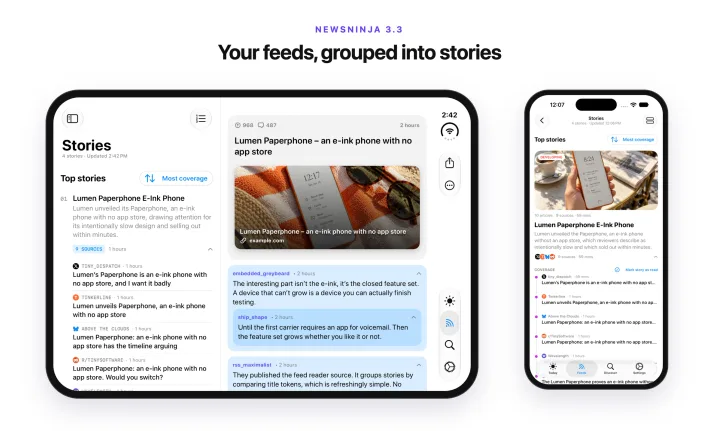
When something big happens, ten of your sources write about it. In a regular list, that means ten headlines saying almost the same thing, mixed with everything else.
Stories shows each event once. NewsNinja groups articles about the same news, writes a title and a one-line overview, and lists every source that covered it underneath. Only news reported by at least two of your sources becomes a story, so what you see is what several of your outlets thought was worth covering.
- Sort by Most coverage to see the day’s biggest news first, or by Latest to see what just changed.
- Expand a story to read the coverage from each source, newest first.
- Mark a whole story as read in one tap when you’re done.
- Across languages. An English and an Italian outlet covering the same event end up in the same story, with the title in your language.
Stories has its own tile in the Feeds tab, right next to Home, and you can add it as a section on Today.
Home or Stories?
Home is still where everything is: every article, video, and post from the sources you follow, with grouping and sorting options to keep it tidy. Stories is the short version, for the days when you only have five minutes. A good routine: start with Stories for the big news, then switch to Home when you have time for the rest.
The Stories guide explains the differences in detail.
To group your articles, NewsNinja only sends headlines and source names to its server. Article text, links, email, and anything about you stay on your device. Stories is part of NewsNinja+.
Top News: the biggest news in the world
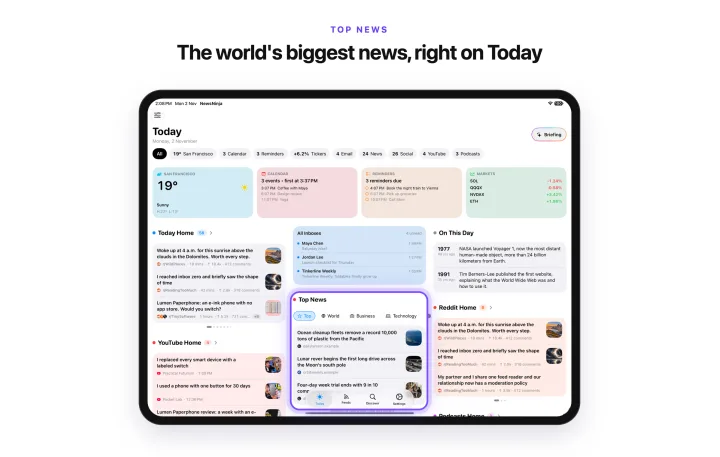
Stories is personal, so it’s only as wide as the feeds you follow. Sometimes you just want to know what the world is talking about.
Top News works like Stories, but with sources chosen by NewsNinja: around 80 feeds from major international outlets, grouped into stories and ranked by how many outlets cover them. It’s updated every 3 hours and organized in topics: Top, World, Business, Technology, Science & Health, Sports, Entertainment, and Gaming.
Top News is free for everyone, and you don’t need to follow a single feed to use it. Find it in the Feeds tab, at the top of Discover, or as a section on Today. In languages other than English, Top News continues to be powered by Kagi News.
The Getting Started guide explains how Top News, Stories, and Home fit together.
Try it on the web
Top News is also on the web at ainews.ninja/news. No app, no account, no sign-up: open the page and see the same stories the app shows, updated every 3 hours. Read more about it here.
New themes for Today
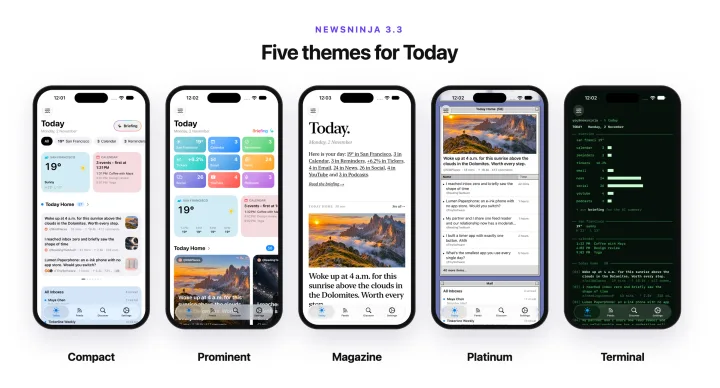
Today now has five themes. Open Customize Today, choose Theme, and pick from a row of live previews:
- Compact: a dense grid of small cards, built for scanning many feeds.
- Prominent: large posters and roomy cards, with images up front.
- Magazine: serif type, hairline rules, and white space, like a magazine spread.
- Platinum: every section is a retro desktop window with a striped title bar.
- Terminal: green monospaced text on black, with no images.
The Overview at the top of Today can now be styled on its own, too: Tiles, Chips, Hero, Magazine, Platinum, or Terminal. By default it follows your theme, but you can mix and match: a Magazine dashboard with a Hero overview, or a Platinum desktop with a shell prompt on top.
Stories and Top News have their own styles as well: Showcase, Briefing, Magazine, and Platinum, from the style menu in the toolbar.
Try it
Update to NewsNinja 3.3, open the Feeds tab, and try Stories and Top News. Then open Customize Today and pick a theme. If a story is grouped strangely, or two stories should have been one, let me know. Every example helps make grouping better.
Thank you to everyone who tested this release and sent feedback along the way.