How NewsNinja syncs all your data in less than 1 MB of iCloud
A technical look at how NewsNinja uses NSUbiquitousKeyValueStore to sync feeds, settings, read articles, and starred articles across devices, and the tricks that keep it all under Apple's 1 MB limit.
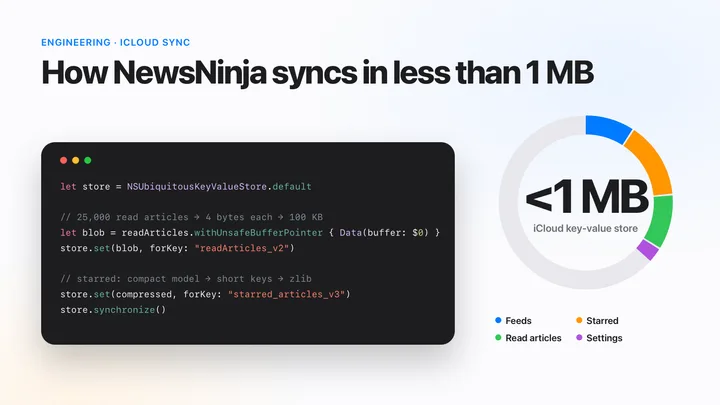
NewsNinja has no account and no sync server, but it still syncs between your iPhone, iPad, Vision Pro, and Mac. Your feeds, categories, settings, read articles, and starred articles all go through a single, small Apple API: NSUbiquitousKeyValueStore, the iCloud key-value store.
The whole thing fits in less than 1 MB. This post explains how the store works, why I picked it, and the tricks that keep NewsNinja inside its limits as the app has grown.
It started with a list of URLs
The first version of NewsNinja was a very simple RSS reader. The only thing that needed to sync was the list of feeds you subscribed to, and a feed list is just a list of URLs.
For that, a real database felt like overkill. Core Data or SwiftData would have meant a schema, a model container, migrations, and a CloudKit container to set up and maintain, all to store an array of strings. I didn’t want to run my own sync server either. NewsNinja doesn’t have accounts, and I wanted to keep it that way.
NSUbiquitousKeyValueStore was exactly the right size for the problem.
How NSUbiquitousKeyValueStore works
If you know UserDefaults, you already know most of the API. It’s a dictionary of keys and property-list values (strings, numbers, booleans, dates, Data, arrays, and dictionaries) that the system syncs through the user’s iCloud account.
To use it, enable the iCloud capability in Xcode and tick Key-value storage. This adds the com.apple.developer.ubiquity-kvstore-identifier entitlement. No CloudKit container or schema needed.
This is close to the first KeyValueStore that shipped in NewsNinja, back in June 2024:
import Foundation
import Combine

class KeyValueStore: ObservableObject {
    static let shared = KeyValueStore()

    private let keyValueStore = NSUbiquitousKeyValueStore.default
    private let rssFeedsKey = "rssFeeds"
    private var cancellable: AnyCancellable?

    @Published var rssFeeds: [String] {
        didSet {
            keyValueStore.set(rssFeeds, forKey: rssFeedsKey)
            keyValueStore.synchronize()
        }
    }

    private init() {
        rssFeeds = keyValueStore.array(forKey: rssFeedsKey) as? [String] ?? []
    }

    func addRssFeed(_ feedUrl: String) {
        guard !rssFeeds.contains(feedUrl) else { return }
        rssFeeds.append(feedUrl)
    }
}
That’s the whole persistence layer: one key, one array of strings. Reading is synchronous and writing is instant, so SwiftUI views can bind to it like any other @Published property.
Writes are local first
When you call set(_:forKey:), the value is written to a local copy on the device right away. The system uploads it to iCloud later, at a time it chooses. synchronize() doesn’t force an upload. As Apple’s documentation puts it, it only “lets iCloud know that new keys and values are available to be uploaded.” It also reads in any changes that have already arrived, so calling it at launch is a good idea.
This also means the store works without iCloud. If the user is signed out, values are still saved on the device and simply don’t sync.
Listening for changes from other devices
When another device changes a value, the system posts didChangeExternallyNotification. The userInfo tells you which keys changed and why:
cancellable = NotificationCenter.default
    .publisher(for: NSUbiquitousKeyValueStore.didChangeExternallyNotification)
    .sink { [weak self] notification in
        let reason = notification.userInfo?[NSUbiquitousKeyValueStoreChangeReasonKey] as? Int
        let changedKeys = notification.userInfo?[NSUbiquitousKeyValueStoreChangedKeysKey] as? [String] ?? []

        switch reason {
        case NSUbiquitousKeyValueStoreServerChange,
             NSUbiquitousKeyValueStoreInitialSyncChange:
            // Another device wrote something, or this is the first download
            Task { @MainActor in self?.reload(keys: changedKeys) }
        case NSUbiquitousKeyValueStoreQuotaViolationChange:
            // The store is over its limit and won't upload new changes
            break
        case NSUbiquitousKeyValueStoreAccountChange:
            // The user switched iCloud accounts and the store was replaced
            break
        default:
            break
        }
    }
NewsNinja starts observing this at launch, calls synchronize() once, and then reloads everything from the store. Every property is compared before it’s assigned, so a sync from another device only refreshes the views whose data actually changed.
The limits
Here’s the catch: the store is designed for small amounts of data.
| Limit | Value |
|---|---|
| Total storage per app, per user | 1 MB |
| Maximum number of keys | 1,024 |
| Maximum key length | 64 bytes (UTF-8) |
| Maximum size of a single value | 1 MB (and it counts toward the total) |
The system also throttles how often it syncs, so it’s not a good fit for data that changes many times per second. And conflict resolution is simple: the last write to a key wins, replacing the whole value.
For a list of feed URLs, none of this matters. A few hundred feeds are a few kilobytes.
Then the app grew
Every time NewsNinja learned something new, it was tempting to put that in the store too. And it was always easy: one new key, one didSet.
Over time, the store picked up:
- Feeds became full channel objects with a name, homepage, icon, and parser type, encoded as JSON.
- Categories, with their feeds and keywords.
- Settings: grouping algorithm and threshold, article limit, reader type, summary type, translation language, list style, hidden read articles, Reddit comment mode, ticker currency, and blocked words.
- Read articles, so an article you read on your iPhone shows as read on your Mac.
- Starred articles, so the articles you save are on every device.
- Email account configuration (connection settings sync between devices; passwords and authorization credentials remain device-local), so you don’t have to set up an inbox twice.
The settings are tiny. The feeds and categories stay small. Read articles and starred articles are different: they grow every day you use the app. Those two are where most of the work went.
Read articles: 25,000 articles in 100 KB
To remember which articles you’ve read, NewsNinja needs some identity for every article you open. The obvious choice is the article URL. But URLs are long. I measured 25,000 typical article URLs encoded as a property list, and they take about 1.9 MB. That’s almost twice the size of the entire store, for one feature.
Store a checksum, not the URL
NewsNinja doesn’t need to know which URL you read. It only needs to answer one question: “Have I seen this article before?” A hash answers that just as well.
From the beginning, NewsNinja stored a CRC32 checksum of each article URL instead of the URL itself. CRC32 is a 32-bit value, so every read article costs exactly 4 bytes, whether its URL is 40 or 400 characters long.
struct CRC32 {
    private static let table: [UInt32] = (0...255).map { i in
        (0..<8).reduce(UInt32(i)) { crc, _ in
            (crc >> 1) ^ (crc & 1 == 1 ? 0xEDB88320 : 0)
        }
    }

    static func checksum(string: String) -> UInt32 {
        ~Data(string.utf8).reduce(~UInt32(0)) { crc, byte in
            (crc >> 8) ^ table[Int((crc & 0xFF) ^ UInt32(byte))]
        }
    }
}

func markArticleAsRead(url: String) {
    readArticles.insert(CRC32.checksum(string: url))
}
CRC32 isn’t a cryptographic hash, but this is not a security feature. Two different URLs can produce the same checksum. With 25,000 read articles in a space of about 4.3 billion values, the chance that a new article falsely shows as read is about 1 in 170,000. If it happens, the worst outcome is one article that looks read when it isn’t. A bigger hash like MD5 or SHA-256 would make collisions even rarer, but at 16 or 32 bytes per article, the same history would take 4 to 8 times the space.
Store raw bytes, not an array of numbers
The first version saved the checksums as an array of numbers: [UInt32]. That works, but a property-list array stores every number as a separate object, with a type marker, the value, and an entry in an offset table. In my measurement, 25,000 checksums stored that way took 275 KB, almost three times the 100 KB of actual data.
So the current format, readArticles_v2, packs the checksums into a single Data blob of 4-byte integers:
// Encode: 25,000 checksums → exactly 100,000 bytes
let snapshot = Array(readArticles)
let data = snapshot.withUnsafeBufferPointer { Data(buffer: $0) }
keyValueStore.set(data, forKey: "readArticles_v2")

// Decode
static func decodeReadArticlesBlob(_ data: Data?) -> Set<UInt32> {
    guard let data, !data.isEmpty,
          data.count.isMultiple(of: MemoryLayout<UInt32>.size) else { return [] }

    let array = data.withUnsafeBytes { buffer in
        Array(buffer.bindMemory(to: UInt32.self))
    }
    return Set(array)
}
One key, one opaque blob, no per-item overhead.
Cap it, and don’t write on every tap
Even at 4 bytes per article, read history grows without limit. So NewsNinja sets a budget: when the history goes over 25,000 articles, it trims it back to 20,000. That’s at most 100 KB, or about 10% of the store, for read state.
Marking articles as read is also the most frequent write in the app. Scrolling through a list with “mark as read” can change dozens of articles in a few seconds. Instead of writing the store every time, NewsNinja debounces the save: it waits 500 milliseconds after the last change, encodes the blob off the main thread, then writes it to the store.
private func scheduleReadArticlesPersist() {
    readArticlesPersistTask?.cancel()
    let articles = readArticles

    readArticlesPersistTask = Task { [weak self] in
        try? await Task.sleep(for: .milliseconds(500))
        guard !Task.isCancelled else { return }

        let data = await Task.detached(priority: .utility) {
            let pruned = Self.prunedReadArticles(articles, threshold: 25_000, retainedCount: 20_000)
            return Array(pruned).withUnsafeBufferPointer { Data(buffer: $0) }
        }.value

        guard !Task.isCancelled else { return }
        self?.keyValueStore.set(data, forKey: "readArticles_v2")
    }
}
The views don’t observe the whole set either. Each change publishes only the checksums that changed, so marking one article as read redraws one row, not the entire list.
Starred articles: when you need the context
Read articles could be reduced to a checksum because a “yes or no” is all that matters. Starred articles are the opposite.
A starred article has to be displayable on its own, on any device, even if you’ve unsubscribed from the feed or the article has dropped out of it. NewsNinja needs to know the title, link, date, image, and source. And NewsNinja isn’t only an RSS reader anymore. A starred Reddit post needs its subreddit, author, score, and comment count. A starred post from X needs its text, author, and media. A starred podcast episode needs its audio URL, duration, and transcript URL.
That’s a lot of context, and there’s no way to hash it away. So I had to get inventive.
Version 1: save the whole article
The first version simply encoded the app’s full article model as JSON and stored the string. It worked, and it was the fastest way to ship the feature. But the full model carries everything the app needs while you’re reading: the description, the content, the complete channel object, and every field from the original Reddit or X response. Most of that isn’t needed to show a starred article in a list, and a few dozen stars could take a meaningful part of the 1 MB store.
Version 2: a dedicated storage model
The fix was to stop persisting the app’s model and introduce a separate, flat storage model with only the fields needed to rebuild a starred article:
struct NNStarredArticleData: Codable {
    let title: String
    let link: URL
    let pubDate: Date?
    let mediaThumbnail: URL?
    let channelFeedURL: URL      // a reference, not the whole channel
    let channelName: String
    let channelImage: String?
    let redditSubreddit: String?
    let redditScore: Int?
    let twitterPost: NNStarredTwitterPostData?
    let audioURL: URL?
    // ...
}
A few decisions do most of the work here:
- No article body. The description and content are never stored. They can be fetched again when you open the article.
- References instead of copies. The channel is stored as its feed URL. When loading, NewsNinja looks the channel up in your feeds and only falls back to the stored name and icon if you’ve unsubscribed.
- Flattened sources. A Reddit post becomes a handful of optional fields. A post from X is converted into a smaller struct with just the text, author, counts, and media URLs.
Categories got the same treatment: they now store a list of feed URLs instead of embedding full copies of every channel.
Short keys
JSON repeats every property name for every object. With hundreds of starred articles, the name redditNumComments is written hundreds of times. So the storage model uses short keys:
private enum CodingKeys: String, CodingKey {
    case title = "t"
    case link = "l"
    case pubDate = "d"
    case channelFeedURL = "cf"
    case channelName = "cn"
    case redditScore = "rsc"
    case redditNumComments = "rcc"
    case twitterPost = "x"
    case audioURL = "au"
    // ...
}
This only changes the encoding. The Swift properties keep their readable names, and the decoder still accepts the old long keys, so data saved by an older version of the app keeps working.
Version 3: compress it
The last step was compression. Starred articles are mostly URLs, and URLs from the same sites share long prefixes like https://www.reddit.com/r/. JSON full of repeated strings compresses very well, so starred_articles_v3 is stored as zlib-compressed Data instead of a JSON string:
private func persistStarredArticles() {
    let storageData = starredArticles.map { NNStarredArticleData(from: $0) }
    guard let json = try? JSONEncoder().encode(storageData),
          let compressed = try? (json as NSData).compressed(using: .zlib) as Data else { return }

    keyValueStore.set(compressed, forKey: "starred_articles_v3")
}

private func loadStarredArticles() -> [FPRssItem] {
    guard let compressed = keyValueStore.data(forKey: "starred_articles_v3"),
          let json = try? (compressed as NSData).decompressed(using: .zlib) as Data,
          let stored = try? JSONDecoder().decode([NNStarredArticleData].self, from: json) else {
        return []
    }
    return stored.map { $0.toRssItem(channels: rssFeedsChannels) }
}
Each step stacks on the previous one: fewer fields, shorter keys, then compression.
Migrating without losing anything
Each format change uses a new key, like readArticles_v2 or starred_articles_v3, instead of overwriting the old one. Loading always tries the newest format first and falls back to older ones:
// v3: compressed Data
if let data = keyValueStore.data(forKey: "starred_articles_v3") { ... }
// v2: plain JSON string with the compact model
else if let json = keyValueStore.string(forKey: "starred_articles_v2") { ... }
// v1: the original full model
else if let json = keyValueStore.string(forKey: "starred_articles") { ... }
This matters because sync is not instant, and not every device updates at the same time. Your iPad might still be running an older version when your iPhone writes a new format. Old keys are removed only after the data has been written in the new format, and before the first migration NewsNinja saves a backup of your feeds and categories as an OPML file in the app’s Documents folder, just in case.
Keeping an eye on the budget
With everything sharing 1 MB, it helps to know where the bytes are going. NewsNinja estimates the size of every synced key by serializing it as a binary property list:
private func estimatePayloadSize(for object: Any) -> Int? {
    try? PropertyListSerialization.data(fromPropertyList: object, format: .binary, options: 0).count
}
This powers a sync status screen in Settings. It shows the estimated store size, the largest keys, when this device last wrote something, when it last heard from iCloud, and any issue such as a quota violation or an account change. When something doesn’t sync, it’s much easier to understand why.
Finally, not everything belongs in iCloud. Reader font, font size, theme, section layout, and feed type colors stay in local UserDefaults. They’re often different on a phone and a Mac, and keeping them local saves a few more bytes.
Was it the right call?
For NewsNinja, yes. NSUbiquitousKeyValueStore gave me two years of cross-device sync with:
- No database to design or migrate.
- No server, and no accounts.
- No CloudKit schema to deploy.
- A synchronous API that works offline and plugs straight into SwiftUI.
It’s plain and simple, and simplicity was exactly what a small RSS reader needed.
The trade-offs are real, though. The 1 MB limit has shaped several features. The last-writer-wins rule works per key, so if two devices change the same key before syncing, one device’s change replaces the other’s. For settings that’s fine. For read history stored as one blob, it means an occasional read mark can be lost when two devices are used at the same time.
Newer features are designed around this rule. Email accounts, for example, aren’t stored as one array. Each account gets its own key, like privateEmailAccount.v2.<id>, and removing an account writes a separate “tombstone” key instead of rewriting a shared list. Adding an inbox on your iPhone while removing another one on your Mac can’t erase each other’s changes, because they never touch the same key.
And every new feature has to ask the same question first: “How many bytes will this cost?”
What’s next: SwiftData
NewsNinja is growing beyond feeds and settings. Future versions will need to store kinds of data that don’t fit in a key-value store: larger, structured, and with relationships between items.
For that, I’m looking at moving to SwiftData with CloudKit sync. Instead of one value per key, it syncs individual records, so merging changes between devices is more precise, and storage isn’t capped at 1 MB. In return, I’ll be taking on everything I avoided at the start: a schema, migrations, and CloudKit’s modeling rules.
That’s the right trade now, but it wasn’t two years ago. If you’re starting an app and all you need to sync is a list of URLs and a few settings, NSUbiquitousKeyValueStore is still a great place to start. Just keep an eye on your bytes.